

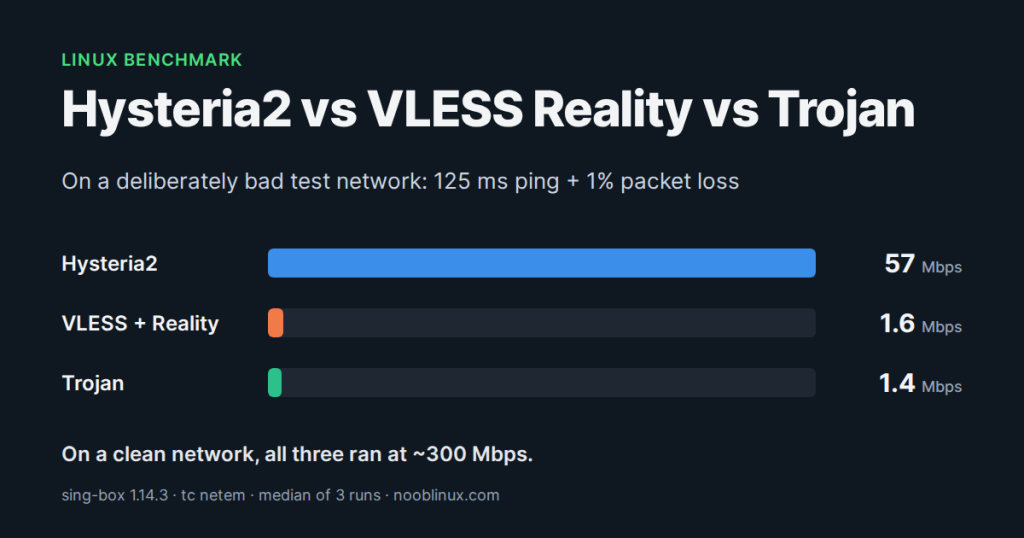
If you read about censorship-resistant proxies, three names keep coming up: Hysteria2, VLESS with Reality and Trojan. Everyone has an opinion about which one is fastest. We wanted numbers, so we set up a small lab on a Linux box, made the network deliberately bad with tc netem, and timed real downloads through all three.
Read this first: these are not normal VPN speeds. To see how each protocol copes with a bad connection, we broke the network on purpose: 125 ms of delay plus packet loss, far worse than a typical home or office line. On a clean connection all three protocols ran at about 300 Mbps in the same test, and that was the limit of our test machine, not of the VPN.
TL;DR
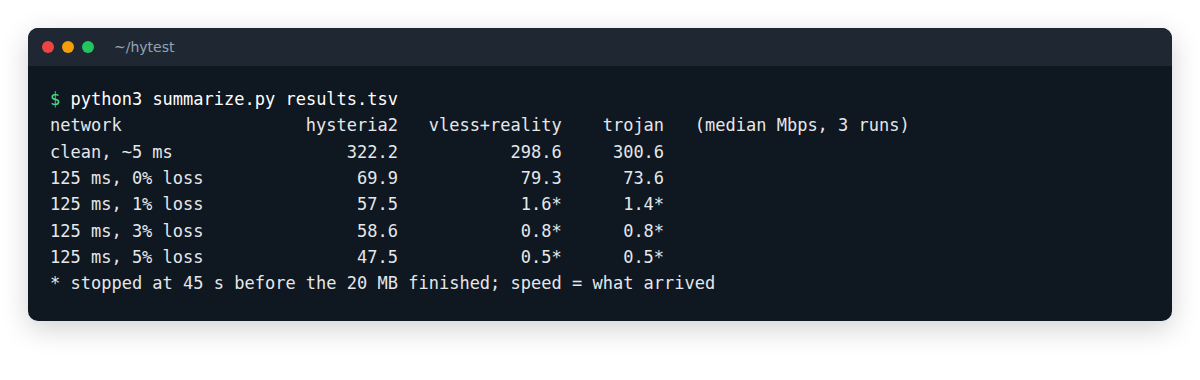
- On a clean network all three are equally fast: 299 to 322 Mbps in our test. That was the limit of the test machine, not of any protocol.
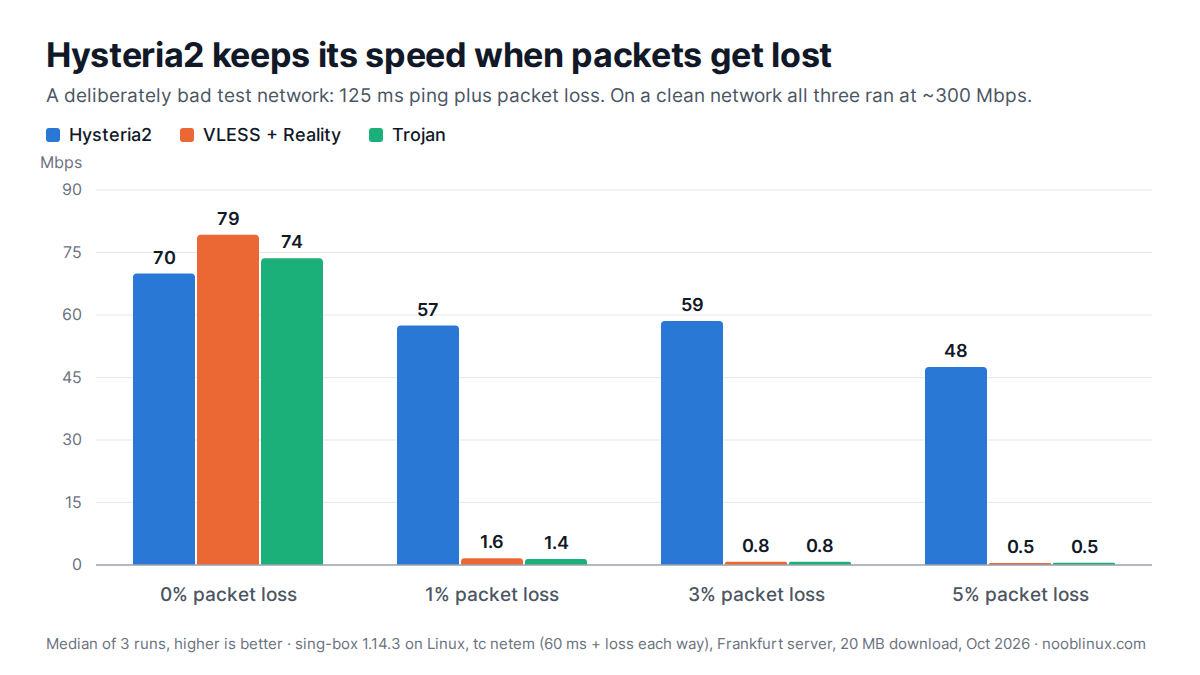
- Over a long link (about 125 ms ping) with no packet loss they are still close: Hysteria2 70, VLESS + Reality 79 and Trojan 74 Mbps. The two TCP protocols were slightly ahead.
- On that same long link with 1% packet loss added (our deliberately bad test network), VLESS and Trojan drop to 1.6 and 1.4 Mbps, while Hysteria2 keeps 57 Mbps, about 35 times faster.
- At 5% loss Hysteria2 still did 48 Mbps. VLESS and Trojan never got above 2.2 Mbps on any lossy run.
- Hysteria2 runs over UDP. On networks that block or throttle UDP, VLESS + Reality is the one that gets through, which is why you want both.
The three protocols in 60 seconds
Trojan
Trojan wraps your traffic in an ordinary TLS connection over TCP and checks a password. To anyone watching, it looks like HTTPS to a website. It is simple and nearly every proxy app supports it, but it needs a real certificate for a real domain, and it is the oldest design of the three.
VLESS + Reality
VLESS is a lightweight proxy protocol from the Xray project. Reality is the clever part: instead of its own certificate, the server borrows the TLS handshake of a real, popular website, so a censor that probes the server sees that website. With the xtls-rprx-vision flow it also avoids the “TLS inside TLS” pattern that DPI systems look for. It runs over TCP.
Hysteria2
Hysteria2 runs over QUIC, which is UDP, so on the wire it looks like HTTP/3. Its big difference is congestion control: it does not treat every lost packet as a signal to slow down, which is exactly what normal TCP does. Hysteria2 also has a fixed-rate mode called Brutal for when you tell it your bandwidth. We did not, so our client used its default, BBR-based mode.
How we tested
The test machine is a Linux server about 5 ms away from a VPNBaron server in Frankfurt. To make the network worse on purpose, we put the VPN client inside a network namespace and used tc netem on both ends of a veth pair to add delay and random packet loss.
- Client: sing-box 1.14.3, one config per protocol, each with a local SOCKS5 port (see what a SOCKS5 proxy is)
- Server: the same Frankfurt server for all three protocols
- Delay: 60 ms each way, so about 125 ms round trip, like a long intercontinental connection
- Packet loss: 0%, 1%, 3%, 5%, applied in both directions
- Download: the first 20 MB of Hetzner’s public speed-test file, through the proxy, with curl
- Each test ran 3 times and we report the median. Downloads still running after 45 seconds were stopped, and their speed counts what arrived in that time.
This is the part that makes the network bad. Everything inside the hytest namespace goes through vn0, so the client gets the delay and loss on the way out and on the way back:
# 60 ms delay and 1% loss, in each direction
sudo tc qdisc add dev vh0 root netem delay 60ms loss 1%
sudo ip netns exec hytest tc qdisc add dev vn0 root netem delay 60ms loss 1%

# remove it again
sudo tc qdisc del dev vh0 root
sudo ip netns exec hytest tc qdisc del dev vn0 root
Results
| Network | Hysteria2 | VLESS + Reality | Trojan |
|---|---|---|---|
| Clean, about 5 ms ping | 322 | 299 | 301 |
| 125 ms ping, 0% loss | 70 | 79 | 74 |
| 125 ms ping, 1% loss | 57 | 1.6 | 1.4 |
| 125 ms ping, 3% loss | 59 | 0.8 | 0.8 |
| 125 ms ping, 5% loss | 48 | 0.5 | 0.5 |
On a clean or merely long connection there is no winner. Hysteria2 does not make a good network faster, and over 125 ms with no loss it was actually a little behind the TCP protocols (70 against 79 and 74 Mbps).
Packet loss changes everything. At 1% loss VLESS and Trojan fell to about 1.6 Mbps, and none of their lossy runs finished the 20 MB download within 45 seconds. Hysteria2 finished every time, at 57 Mbps with 1% loss, 59 Mbps with 3% loss and 48 Mbps with 5% loss: much slower than its 300 Mbps on the clean network, but still very usable.
Why TCP falls off a cliff
VLESS and Trojan both ride on TCP, and TCP reads every lost packet as congestion: it cuts its sending window and then grows it back slowly, one round trip at a time. On a long link those round trips are slow. A classic rule of thumb (the Mathis formula) puts the ceiling at roughly:
speed ≈ (MSS / RTT) × 1.22 / √loss
      ≈ (1460 bytes × 8 / 0.125 s) × 1.22 / √0.01
      ≈ 1.1 Mbps
That is right where VLESS and Trojan landed (1.6 and 1.4 Mbps; modern TCP does a bit better than the formula). It does not matter how fast your line is. Hysteria2 runs its own transport over UDP: it measures what the path can carry, keeps sending at that rate and simply resends what got lost.
So which one should you use?
- Hysteria2 when the connection is long or lossy: hotel and airport Wi-Fi, mobile data, a crowded home network, or a server on another continent.
- VLESS + Reality when UDP is blocked or throttled (many office networks, some ISPs, networks with heavy DPI), or when the connection has to look like plain HTTPS to a real website.
- Trojan only when your app supports nothing newer.
- Or don’t pick at all and let the app test what works on your network (more on that below).
Trying Hysteria2 and VLESS Reality on Linux
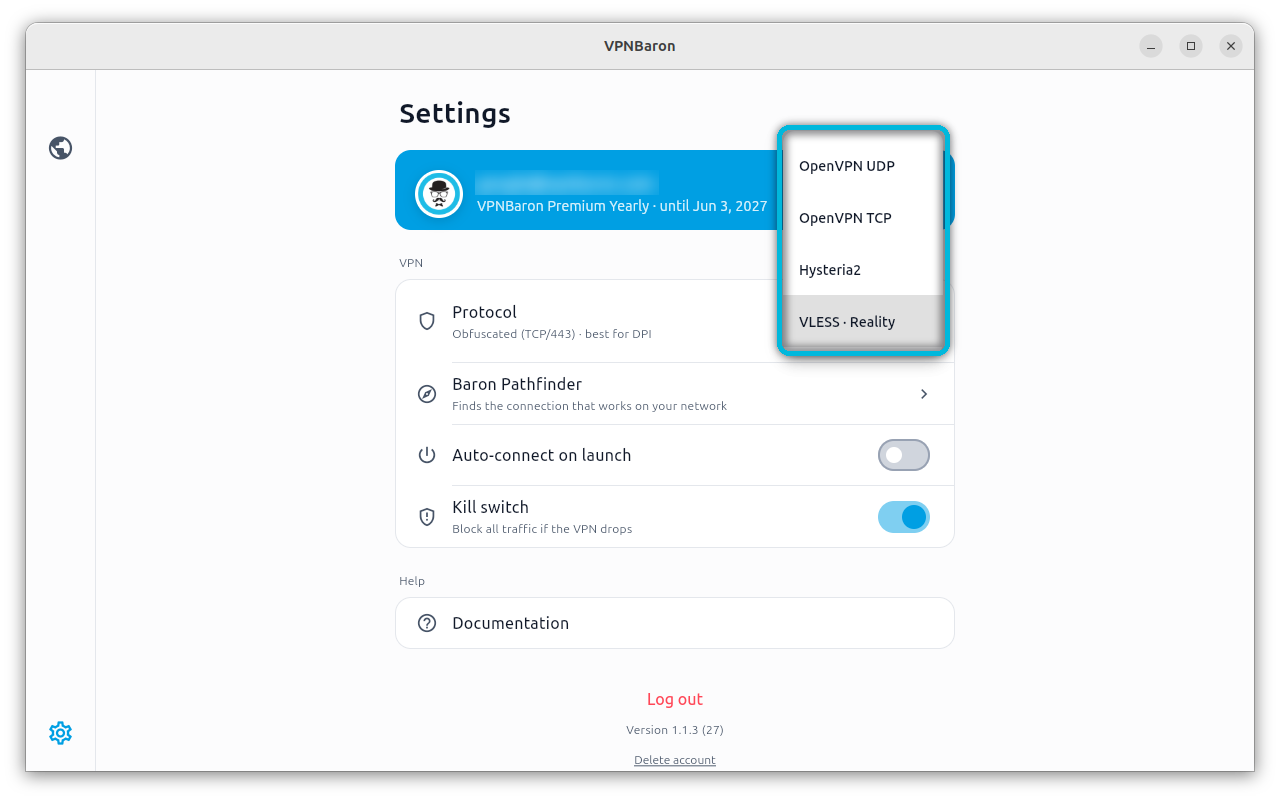
VPNBaron’s Linux app has both protocols built in, next to OpenVPN, on every server location. It runs on Ubuntu 24.04+ and Debian 13+, on Intel, AMD and ARM:
curl -fsSL https://vpnbaron.com/download/linux/install.sh | sh
In Settings, Protocol, you pick Hysteria2 or VLESS · Reality yourself:
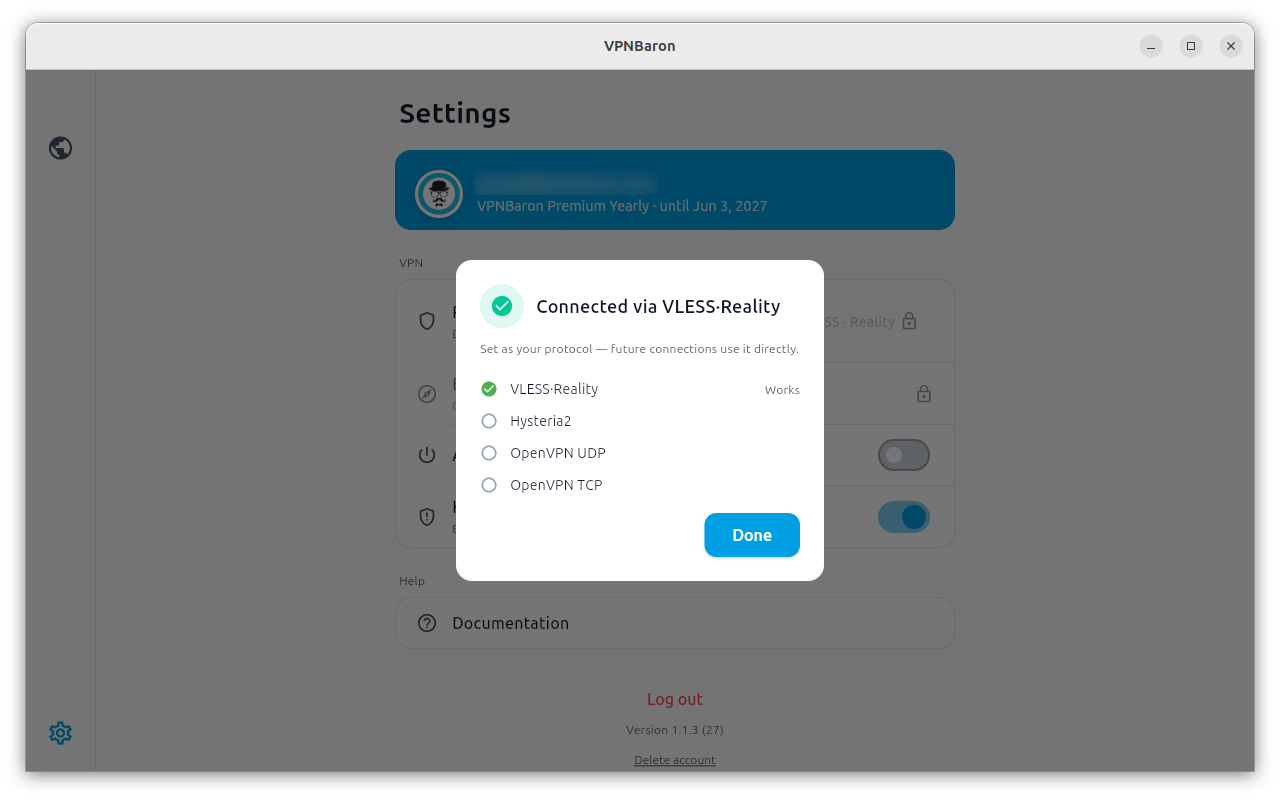
If you don’t know what your network allows, Baron Pathfinder tests the protocols on the network you are on and keeps the one that connects:
More about how the stealth protocols work: VPNBaron stealth VPN. Step-by-step setup: Hysteria2 and VLESS Reality on Linux.
Repeat the test yourself
You need a Linux box with root, sing-box, and a server you can reach with each protocol. First, a namespace and a veth pair:
sudo ip netns add hytest
sudo ip link add vh0 type veth peer name vn0
sudo ip link set vn0 netns hytest
sudo ip addr add 10.200.0.1/24 dev vh0
sudo ip link set vh0 up
sudo ip netns exec hytest ip addr add 10.200.0.2/24 dev vn0
sudo ip netns exec hytest ip link set vn0 up
sudo ip netns exec hytest ip link set lo up
The namespace has no route to the internet. Instead of NAT, we ran a small sing-box relay on the host that listens on 10.200.0.1 and forwards to the real server: UDP 4443 for Hysteria2, TCP 4444 for VLESS, TCP 4445 for Trojan. The clients connect to 10.200.0.1, so all of their traffic crosses the netem links. (NAT with MASQUERADE works too.)
{
  "inbounds": [
    { "type": "direct", "listen": "10.200.0.1", "listen_port": 4443, "network": "udp",
      "override_address": "YOUR.SERVER", "override_port": 443 },
    { "type": "direct", "listen": "10.200.0.1", "listen_port": 4444, "network": "tcp",
      "override_address": "YOUR.SERVER", "override_port": 443 }
  ],
  "outbounds": [ { "type": "direct" } ]
}
One client config per protocol, each with its own SOCKS port. Hysteria2:
{
  "inbounds": [ { "type": "socks", "listen": "127.0.0.1", "listen_port": 1081 } ],
  "outbounds": [ {
    "type": "hysteria2",
    "server": "10.200.0.1", "server_port": 4443,
    "password": "YOUR-PASSWORD",
    "tls": { "enabled": true, "server_name": "YOUR.SERVER" }
  } ]
}
VLESS + Reality:
{
  "inbounds": [ { "type": "socks", "listen": "127.0.0.1", "listen_port": 1082 } ],
  "outbounds": [ {
    "type": "vless",
    "server": "10.200.0.1", "server_port": 4444,
    "uuid": "YOUR-UUID",
    "flow": "xtls-rprx-vision",
    "tls": {
      "enabled": true,
      "server_name": "REALITY-SNI",
      "utls": { "enabled": true, "fingerprint": "chrome" },
      "reality": { "enabled": true, "public_key": "SERVER-PUBLIC-KEY", "short_id": "SHORT-ID" }
    }
  } ]
}
Then start a client inside the namespace and download through it:
sudo ip netns exec hytest sing-box run -c hysteria2.json &
sudo ip netns exec hytest curl -s -o /dev/null --max-time 45 \
  --socks5-hostname 127.0.0.1:1081 -r 0-19999999 \
  -w '%{size_download} bytes in %{time_total}s\n' \
  https://fsn1-speed.hetzner.com/100MB.bin
Two lessons from our own runs:
- Give every protocol its own SOCKS port and check who owns it (
ss -ltnp) before each run. In our first attempt, a client left over from an earlier run kept port 1080, every new client failed to start, and a whole run measured Trojan three times. We threw those results away. - Use a real file host. One popular speed-test endpoint started rate-limiting us and returned 1-byte answers with HTTP 200, which looks like an instant download. Record the byte count and the HTTP code with every run.
FAQ
Is Hysteria2 faster than VLESS?
Only when the network loses packets. On a clean link VLESS + Reality was as fast or slightly faster in our test. With 1% loss or more, Hysteria2 was many times faster.
Is VLESS Reality detectable?
It is designed to be very hard to tell apart from a normal TLS connection to a real website, and that is its strength. No protocol stays undetectable forever, which is why it helps to have more than one.
Why not just use Hysteria2 everywhere?
Because it needs UDP. Some networks block UDP or slow it down, and there Hysteria2 cannot connect at all, while VLESS + Reality on TCP port 443 gets through.
